Nested List in HTML
A nested list is a list inside another list. This is used when you want to show hierarchy, categories, or sub-points under a main item. Think of it like an outline or a tree structure where items can have children.
For example:
- A main category (like Programming Languages) can have sub-categories (like Python, Java, JavaScript).
- A step-by-step guide (ordered list) can have detailed explanations (unordered sub-list).

🔹 Tags Involved
- ul → Unordered List (creates bullet points).
- ol → Ordered List (creates numbers, letters, roman numerals).
- li → List Item, used inside ul or ol.
- Nesting happens when you put another ul or ol inside an li.
🔹 Why Use Nested Lists?
- To organize content in levels (main idea → sub-points).
- To create menu structures (like navigation bars).
- To show hierarchical data (like categories, outlines, steps).
🔹 Example 1: Unordered inside Unordered
            <ul>
                <li>Frontend
                    <ul>
                        <li>HTML</li>
                        <li>CSS</li>
                        <li>JavaScript</li>
                    </ul>
                </li>
                <li>Backend
                    <ul>
                        <li>Node.js</li>
                        <li>Python</li>
                        <li>Java</li>
                    </ul>
                </li>
            </ul>
Output:
- Frontend
- HTML
- CSS
- JavaScript
- Backend
- Node.js
- Python
- Java
🔹 Example 2: Ordered + Unordered
            <ol>
                <li>Make Tea
                    <ul>
                        <li>Boil Water</li>
                        <li>Add Tea Leaves</li>
                        <li>Add Sugar & Milk</li>
                    </ul>
                </li>
                <li>Serve in Cup</li>
            </ol>
Output:
- Make Tea
- Boil Water
- Add Tea Leaves
- Add Sugar & Milk
- Serve in Cup
🔹 Example 3: Ordered inside Ordered
            <ol>
                <li>Chapter 1
                    <ol>
                        <li>Section 1.1</li>
                        <li>Section 1.2</li>
                    </ol>
                </li>
                <li>Chapter 2
                    <ol>
                        <li>Section 2.1</li>
                        <li>Section 2.2</li>
                    </ol>
                </li>
            </ol>
Output:
- Chapter 1
- Section 1.1
- Section 1.2
- Chapter 2
Table in HTML
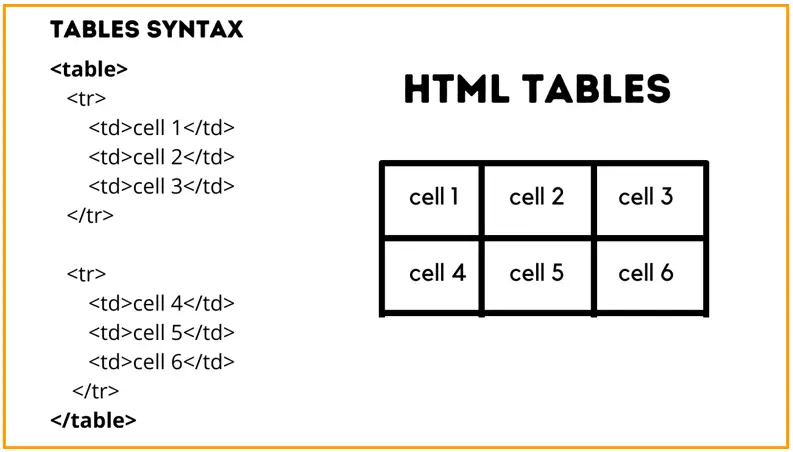
|
A table is a structured way to display data in rows and columns, like a spreadsheet. Tables are widely used for:
|
🔹 Basic Table Tags
- table : Container for the entire table
- tr : Table Row
- th : Table Header Cell (usually bold & centered)
- td : Table Data Cell (normal data cell)
- caption : Optional title for the table
🔹 Basic Example
            <table border="1">
                <caption>Student Scores</caption>
                <tr>
                    <th>Name</th>
                    <th>Math</th>
                    <th>Science</th>
                </tr>
                <tr>
                    <td>Alice</td>
                    <td>90</td>
                    <td>85</td>
                </tr>
                <tr>
                    <td>Bob</td>
                    <td>75</td>
                    <td>80</td>
                </tr>
            </table>
Output:
| Name | Math | Science |
| Alice | 90 | 85 |
| Bob | 75 | 80 |
- Caption at the top: "Student Scores"
- Header row bold & centered
- Rows of data underneath
🔹 Table Attributes
- Border
<table border="1">
- Adds a border around cells.
- Cellpadding & Cellspacing
<table cellpadding="10" cellspacing="5">
- cellpadding → space inside cells
- cellspacing → space between cells
- Width & Height
<table width="80%">
- Sets table width relative to page or in pixels
Row & Column Span
Sometimes a cell needs to span multiple rows or columns:
- Colspan → spans multiple columns
- Rowspan → spans multiple rows
🔹Example:
            <table border="1">
                <tr>
                    <th>Name</th>
                    <th colspan="2">Scores</th>
                </tr>
                <tr>
                    <td>Alice</td>
                    <td>Math</td>
                    <td>Science</td>
                </tr>
            </table>
Output:
| Name | Scores | |
|---|---|---|
| Alice | Math | Science |
Nested Tables
Tables can be nested inside a cell to create more complex layouts.

🔹Example:
            <table border="1">
                <tr>
                    <td>Outer Cell
                    <table border="1">
                        <tr><td>Inner 1</td></tr>
                        <tr><td>Inner 2</td></tr>
                    </table>
                    </td>
                </tr>
            </table>
Output:
Outer Cell
|